Books that can't quietly break.

Free accounting software that lives on your computer. Plain English on top, real double-entry underneath — and a way to bring your whole history with you from whatever you're using now, proved to the penny before you trust it.

Windows today. No account, no subscription, no cloud.

Switching

Bring your whole history — from QuickBooks, Sage, or anything that can export a spreadsheet

Changing accounting software usually means typing in one starting balance and leaving everything behind it in the old program. Not here. If what you use today can export its chart of accounts and its general ledger to CSV or Excel, Balanced Sum will take the whole thing — every transaction, every year.

Export two files from the software you use now

Your list of accounts, and your general ledger or journal. CSV or Excel, whichever your program offers.

Match up the columns — we guess, you confirm

Balanced Sum reads your file's headers and proposes which column is the date, the account, the amount, and so on. It ships starting guesses for Sage BusinessWorks, Sage 50 (Peachtree), Xero, Wave and FreshBooks, plus two plain-spreadsheet shapes for everything else. You confirm every column before anything is read for real.

Prove it reconciles before you trust it

Anything that doesn't add up is listed in English, and nothing posts until it's clean. Then each year is compared against your old software's own trial balance, account by account — and it doesn't lock until every account matches exactly.

See exactly how switching works, step by step →

Home screen

Open the app and see what needs you

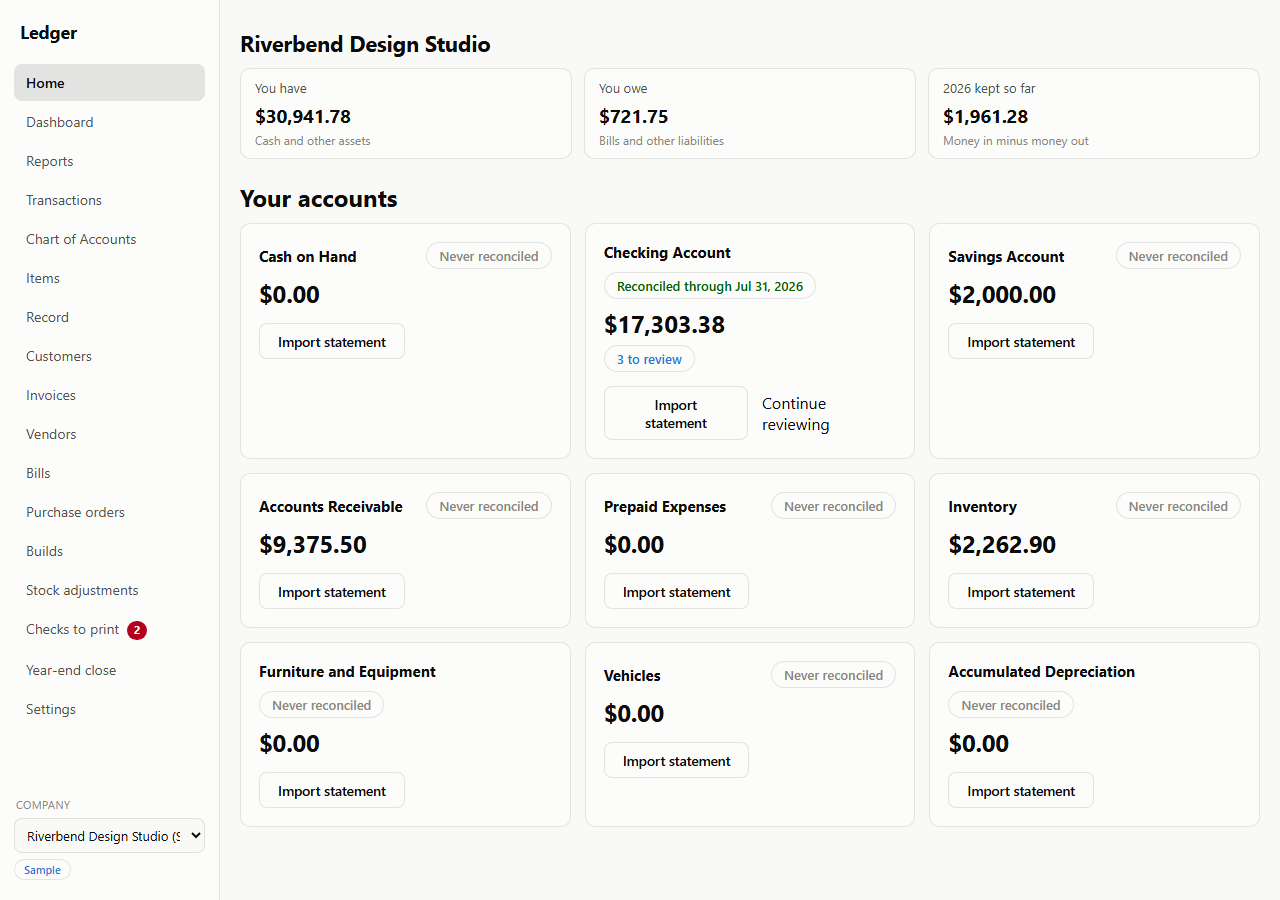
No dashboard full of numbers you have to interpret. What you have, what you owe, and what you've kept this year sit across the top; underneath, every account tells you plainly whether it's caught up or waiting on you — reconciled through a date, never reconciled yet, or with a short list of lines to review.

Every card is a way in: import a statement, or pick up the review you left half done.

The home screen for the sample company Riverbend Design Studio. Three tiles read You have $30,941.78, You owe $721.75, and 2026 kept so far $1,961.28. Below them a grid of account cards: Checking Account is badged reconciled through Jul 31 2026, shows $17,303.38 and offers a 3 to review link and a Continue reviewing button; Cash on Hand, Savings, Accounts Receivable, Inventory and the fixed-asset accounts are each badged never reconciled with an Import statement button.
The home screen — every account says whether it's caught up or waiting on you.
Reconciling

Import the statement, work down the list

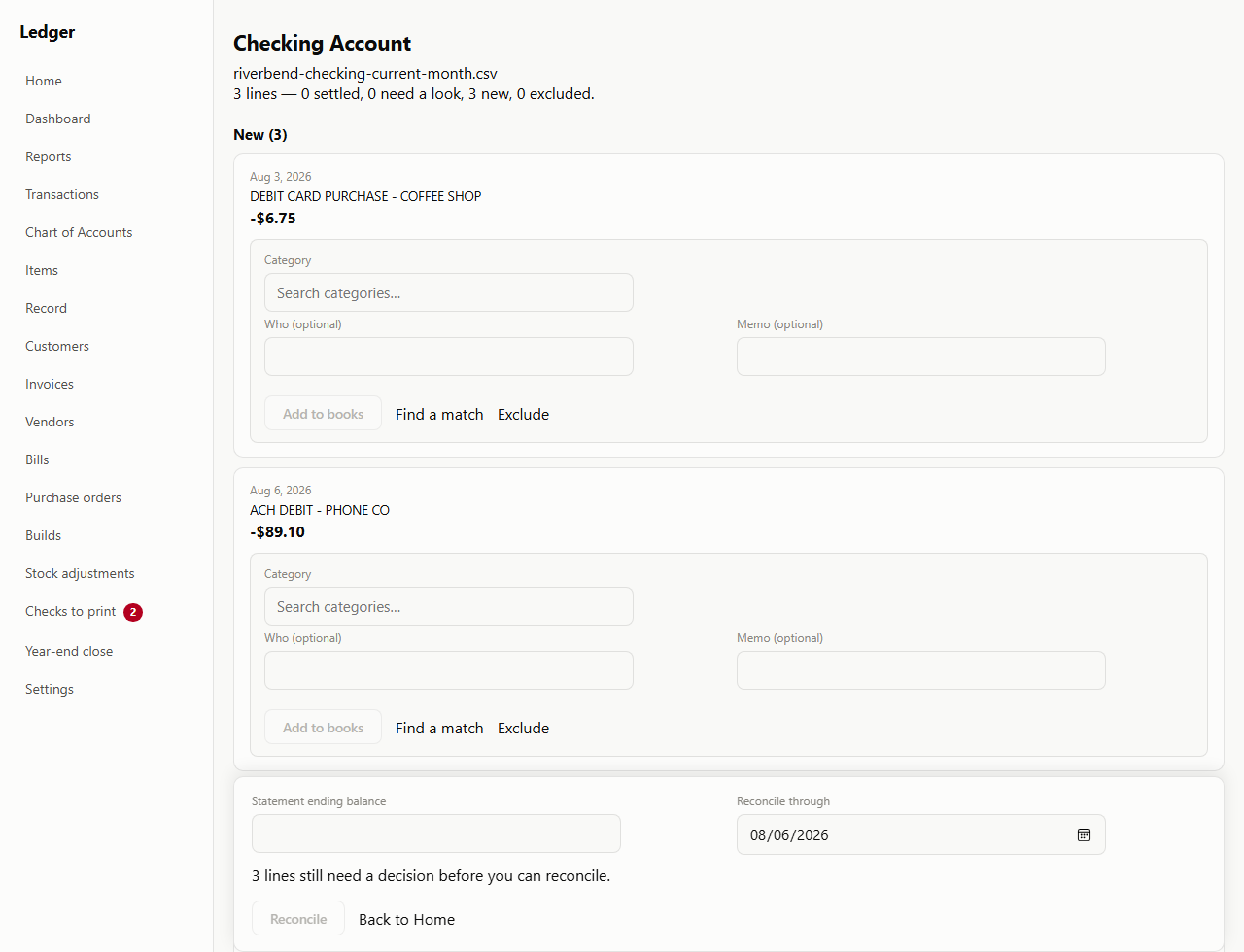
Bring in a statement as CSV, OFX or QFX and every line is sorted for you: already matched to something you recorded, needing a second look, or new and waiting on a category. You give each one a decision — categorize it, find its match, or exclude it — and nothing is filed behind your back.

The reconcile button stays out of reach until every line has been dealt with. When the bank ties out, the books are right; that's the whole job, most days.

A statement review for the Checking Account, headed with the imported file name and the line count: 3 lines — 0 settled, 0 need a look, 3 new, 0 excluded. Two new lines are shown in full, a $6.75 debit card purchase at a coffee shop and an $89.10 ACH debit to a phone company, each with an empty category search box, optional Who and Memo fields, and Add to books, Find a match and Exclude choices. A panel at the foot asks for the statement ending balance and a reconcile-through date, and says three lines still need a decision before you can reconcile.
A statement, line by line. Nothing reconciles until every line has a decision.
Recording money

Money came in. Money went out. That's it.

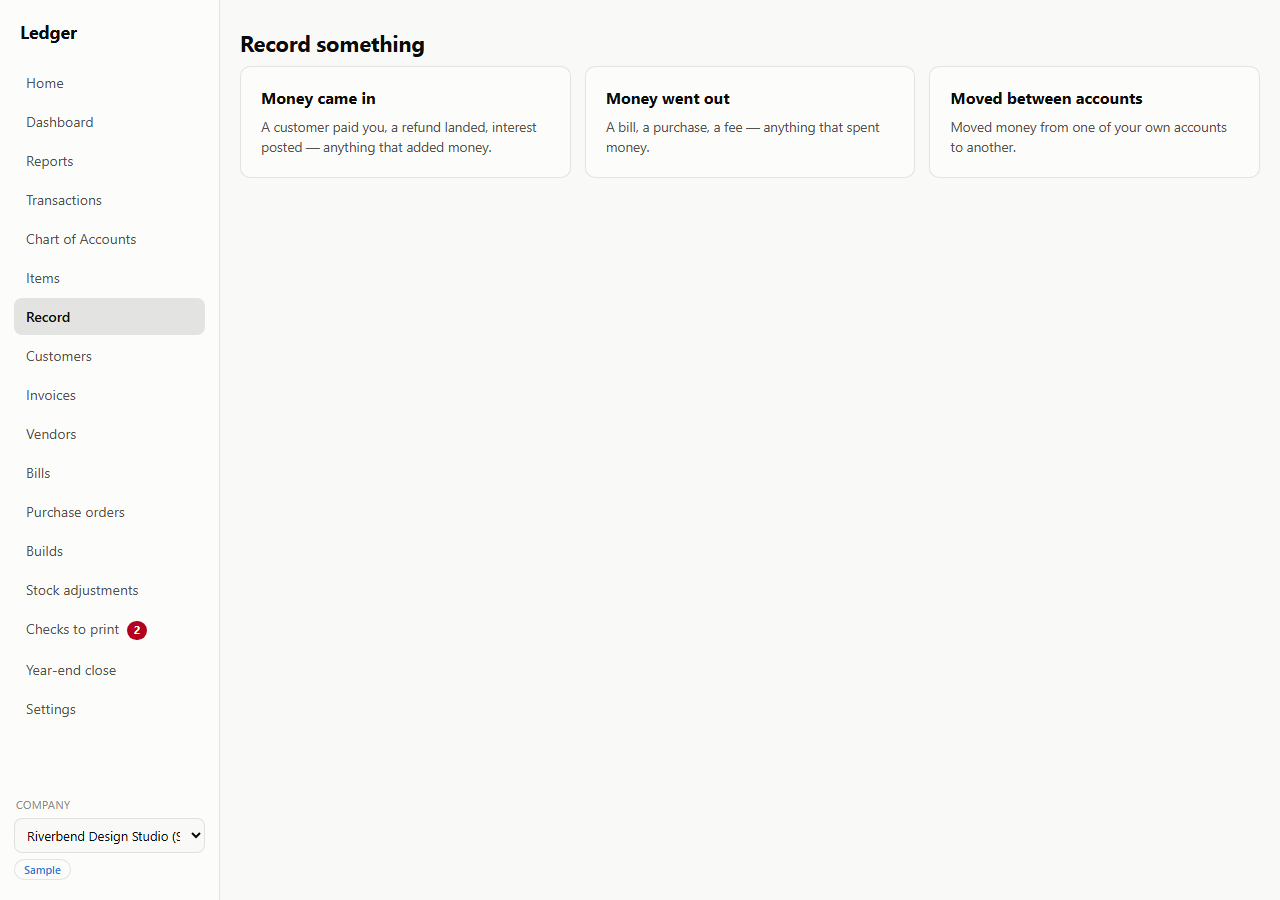
You'll never be asked to pick between a "sales receipt," a "deposit," and a "customer payment" before you can tell the app you got paid. There's one flow for that, and one for spending money, in plain English.

The double-entry bookkeeping still happens underneath, correctly, every time — and it's all there to look at whenever you want it, on the Transactions screen below.

A screen headed Record something, offering three choices side by side. Money came in — a customer paid you, a refund landed, interest posted, anything that added money. Money went out — a bill, a purchase, a fee, anything that spent money. Moved between accounts — moved money from one of your own accounts to another.
Recording something starts here — three plain-English choices, no document types to learn.
Getting paid

Invoices, and getting paid

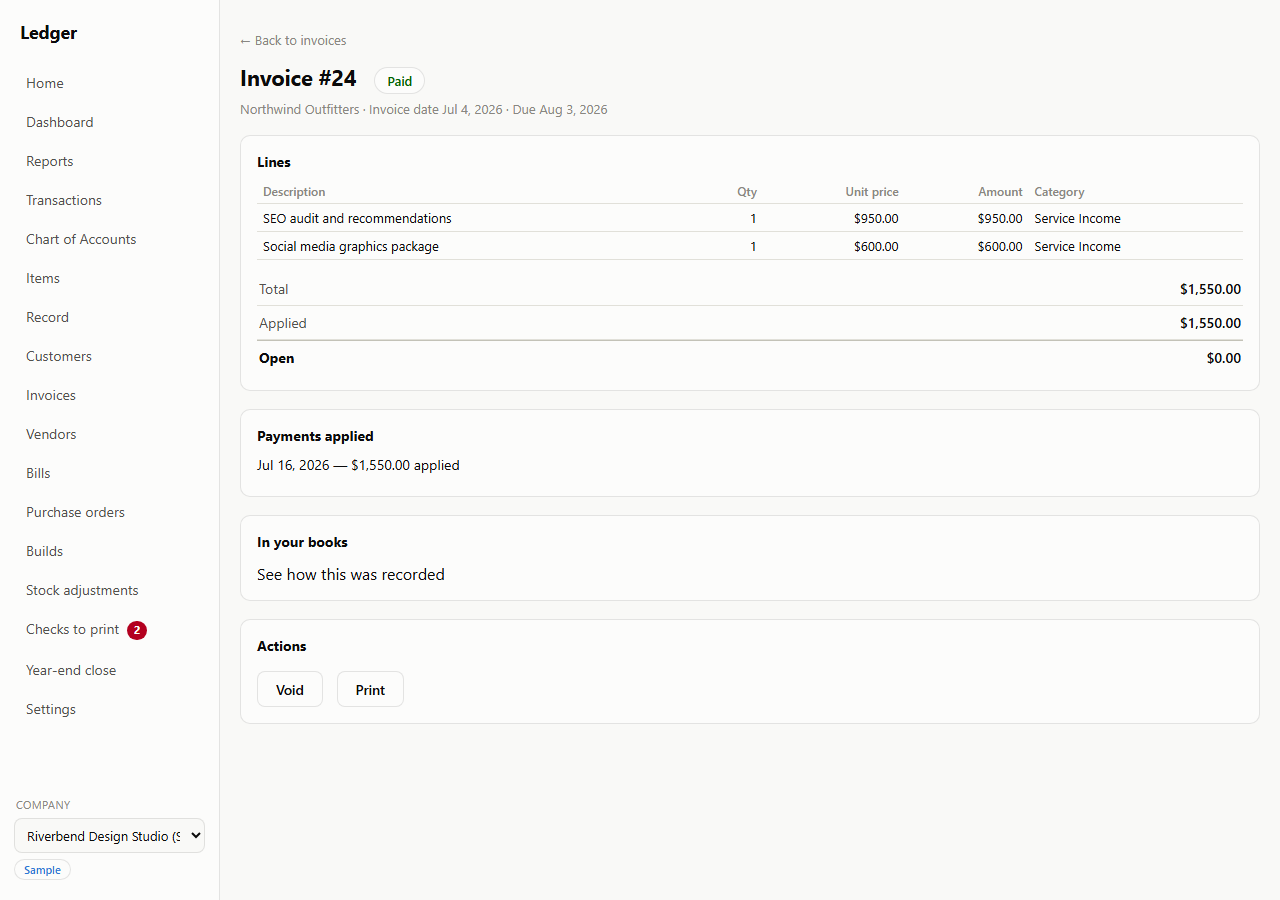
Write an invoice, print it or save it as a PDF, then record the payment against it when it arrives — full, partial, or with a credit applied. Accounts receivable and your aging report update themselves; you never touch a balance directly. The invoice keeps its own running total of what's been applied and what's still open.

If you charge sales tax, turn it on and it appears: a rate per invoice, a taxable checkbox per line, and its own payable account so you always know what you owe the state. If you don't, you'll never see any of it.

Invoice #24 for the customer Northwind Outfitters, badged Paid, dated Jul 4 2026 and due Aug 3 2026. Two lines — an SEO audit at $950.00 and a social media graphics package at $600.00, both categorized Service Income — total $1,550.00, with $1,550.00 applied and $0.00 open. Below sit a Payments applied panel reading Jul 16 2026 — $1,550.00 applied, an In your books panel offering to show how this was recorded, and Void and Print buttons.
An invoice with its payment applied — and a link straight through to the entry behind it.
Paying vendors

Bills, and printed checks

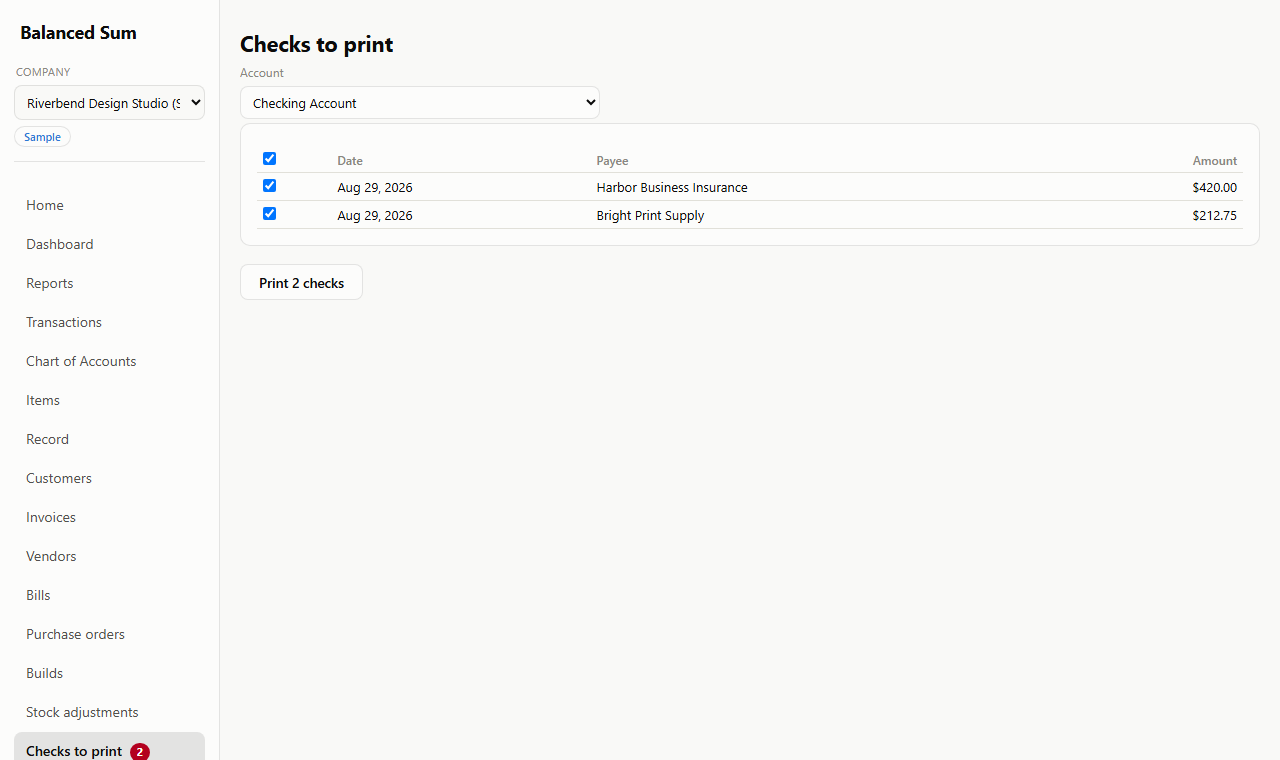
Enter a bill when it arrives, pay it when it's due, and print the check straight from the app — voucher stock (check plus two stubs) or three-per-page stock, whichever you already have sitting in the printer tray.

Check numbers are assigned once, up front, and listed before anything reaches the printer, so you always know which number went to whom. The page itself prints only the variable fields — date, payee, amount in figures and in words — because your pre-printed stock already carries everything else.

A check print run headed 2 checks assigned, listing #4 to Dana Reyes Freelance Design for $650.00 and #5 to Bright Print Supply for $318.60, with a Print button and a Done button. Beneath is the print preview: each check is a mostly blank page carrying only the check number, the date Aug 4 2026, the payee name, the amount in figures and the amount written out in words, positioned to land in the right places on pre-printed check stock.
A print run with its numbers already assigned. Only the variable fields print — the stock in your tray supplies the rest.
Reporting

Statements you can hand to your accountant

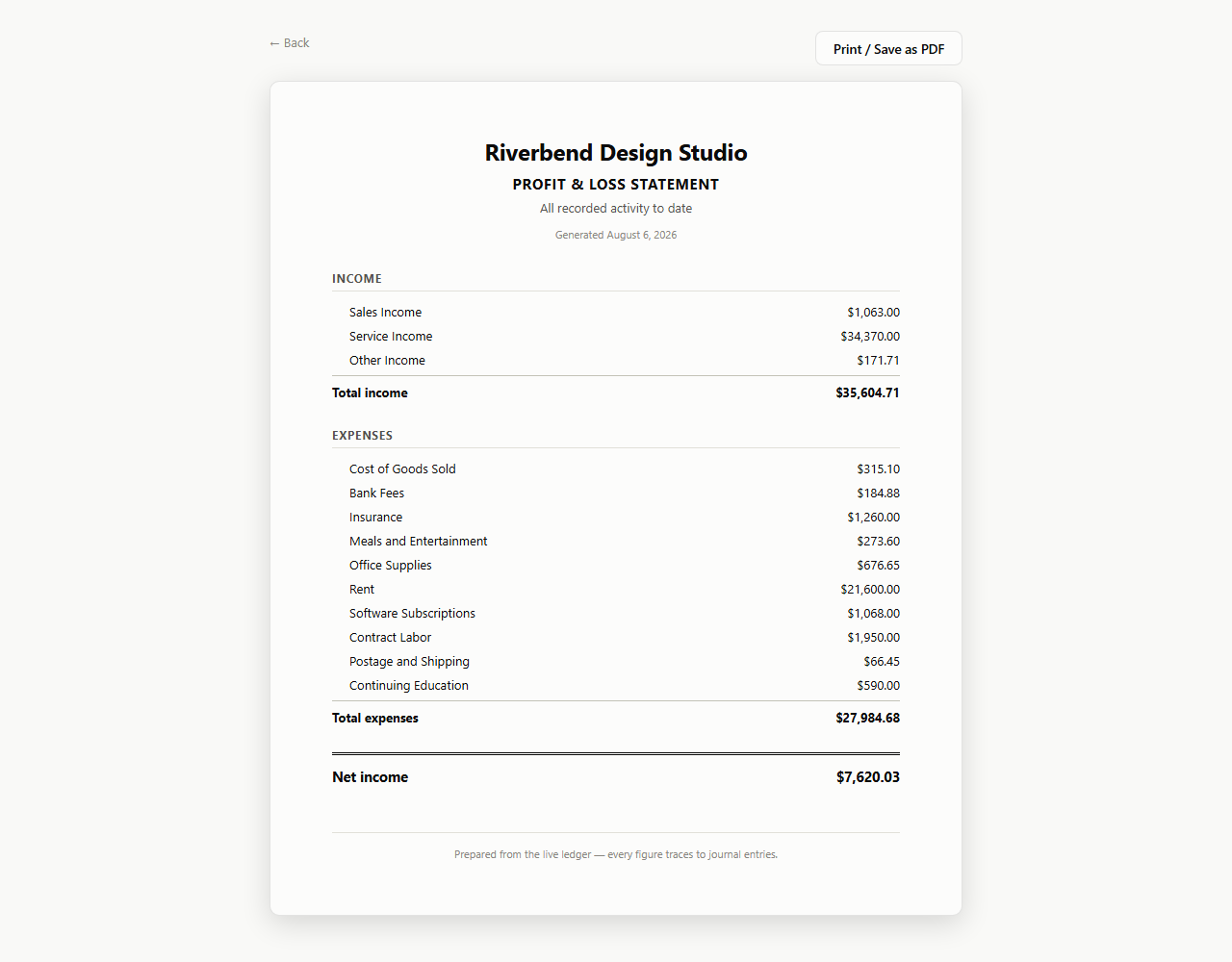
Profit & loss for any date range; balance sheet, trial balance and A/R and A/P aging as of any date you pick. The profit & loss and the balance sheet each have a clean printable version you send straight to PDF from your browser — no spreadsheet export, no formatting to clean up first.

A printable profit and loss statement headed Riverbend Design Studio, covering all recorded activity to date. Income lists Sales Income $1,063.00, Service Income $34,370.00 and Other Income $171.71, totalling $35,604.71. Ten expense accounts from Cost of Goods Sold through Rent to Continuing Education total $27,984.68, leaving net income of $7,620.03. A footer line reads: prepared from the live ledger — every figure traces to journal entries.
A profit & loss statement, ready to print — no spreadsheet cleanup first.
Drill-through

Every number explains itself

Click an account on your profit & loss, balance sheet or trial balance and it opens that account's register, in plain English, back to the original entry — including one imported from your old software years after it happened. A row on an aging report opens that customer's invoices or that vendor's bills. Numbers here aren't dead ends.

The running balance in the last column is worked out from the entries themselves every time you look. Nothing is stored, so nothing can drift. Debits and credits are one checkbox away when you want them, and out of your way when you don't.
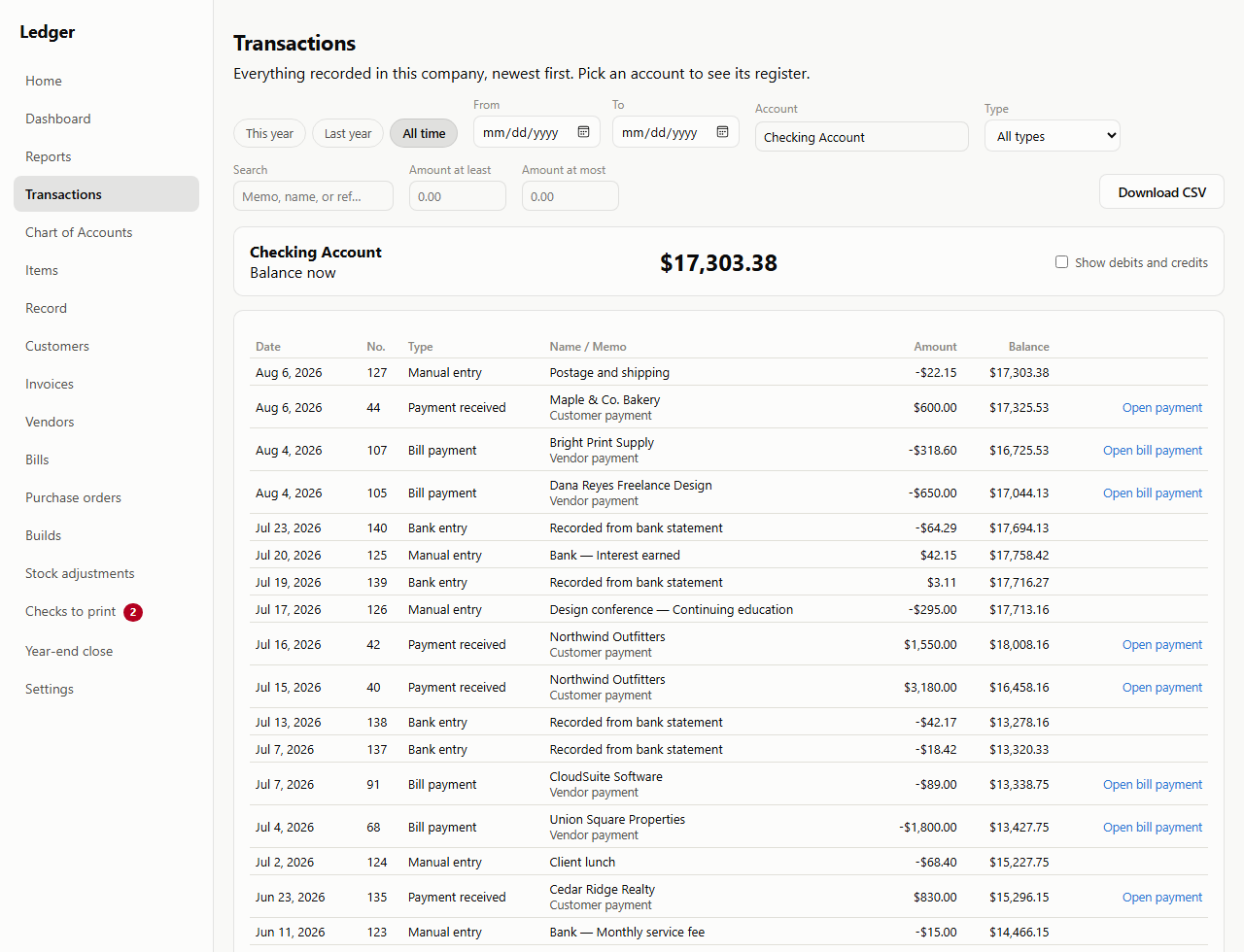
The register for a single account: a header reading Checking Account, Balance now $17,303.38, with a Show debits and credits checkbox. Below, every entry touching the account in date order — manual entries, payments received, bill payments and lines recorded from a bank statement — each showing a date, entry number, type, name and memo, a signed amount, and the running balance after it, from $17,303.38 at the top down to $14,466.15. Rows that came from a document carry an Open invoice, Open bill or Open payment link.
Click any account and you get its register — running balance included, recalculated every time you look.
The register

Every transaction, in one list

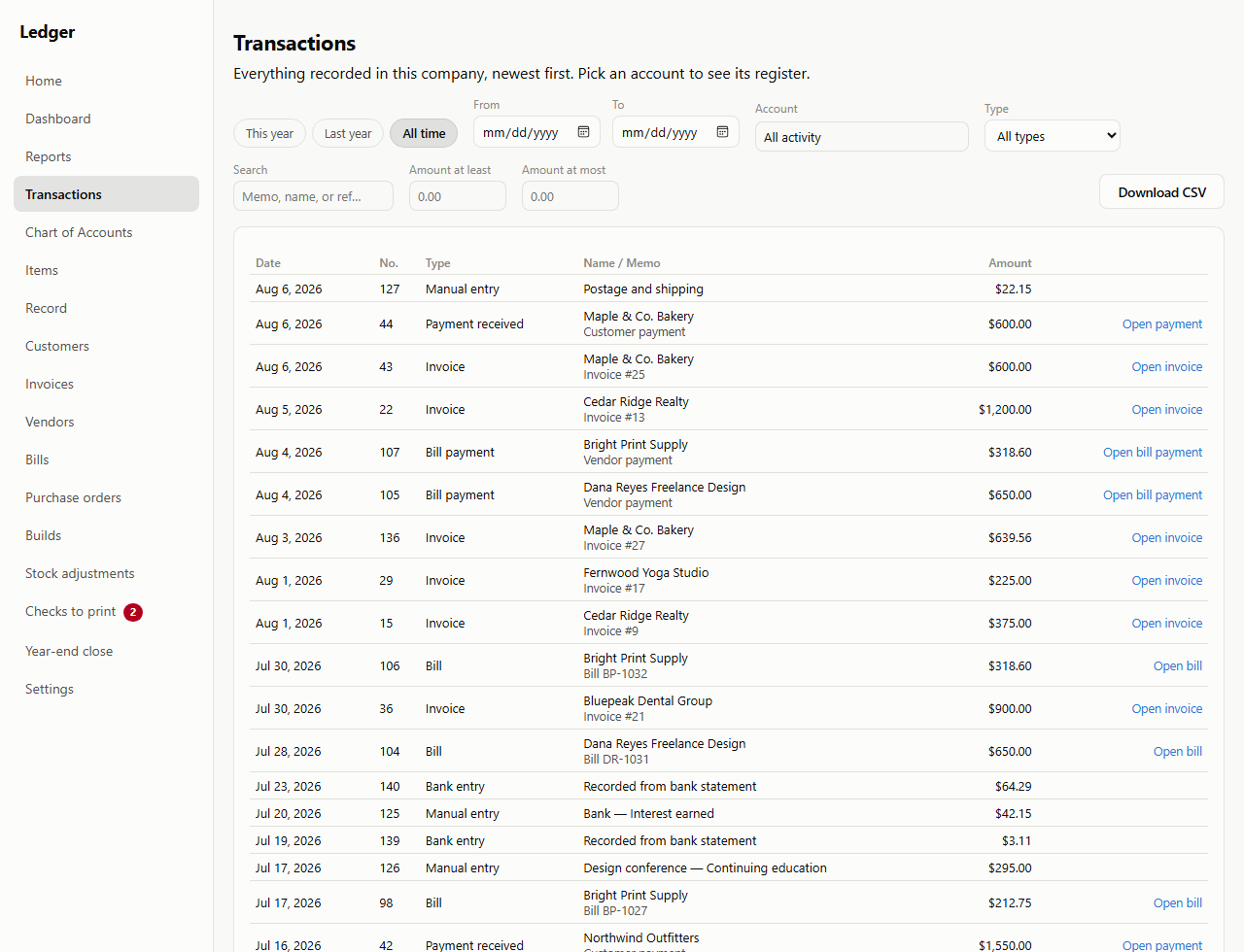
The Transactions screen shows everything the company has posted, newest first — drafts you haven't issued yet stay on their own screens until you do. Filter by date, account, type or amount, or search the memos. Pick an account and the list becomes that account's register.

Download whatever you're looking at as a CSV, up to 100,000 rows — the filters you set are the file you get.

The Transactions screen, subtitled: everything recorded in this company, newest first — pick an account to see its register. A row of filters offers This year, Last year and All time buttons, from and to dates, an account picker set to All activity, a type picker set to All types, a memo search box, minimum and maximum amount boxes, and a Download CSV button. The list below mixes manual entries, invoices, bills, bill payments, payments received and bank entries, each with a date, number, type, customer or vendor name, memo and amount.
One list for everything the company has posted — filtered however you like, downloadable as it stands.
Chart of accounts

Ordinary accounting, in plain sight

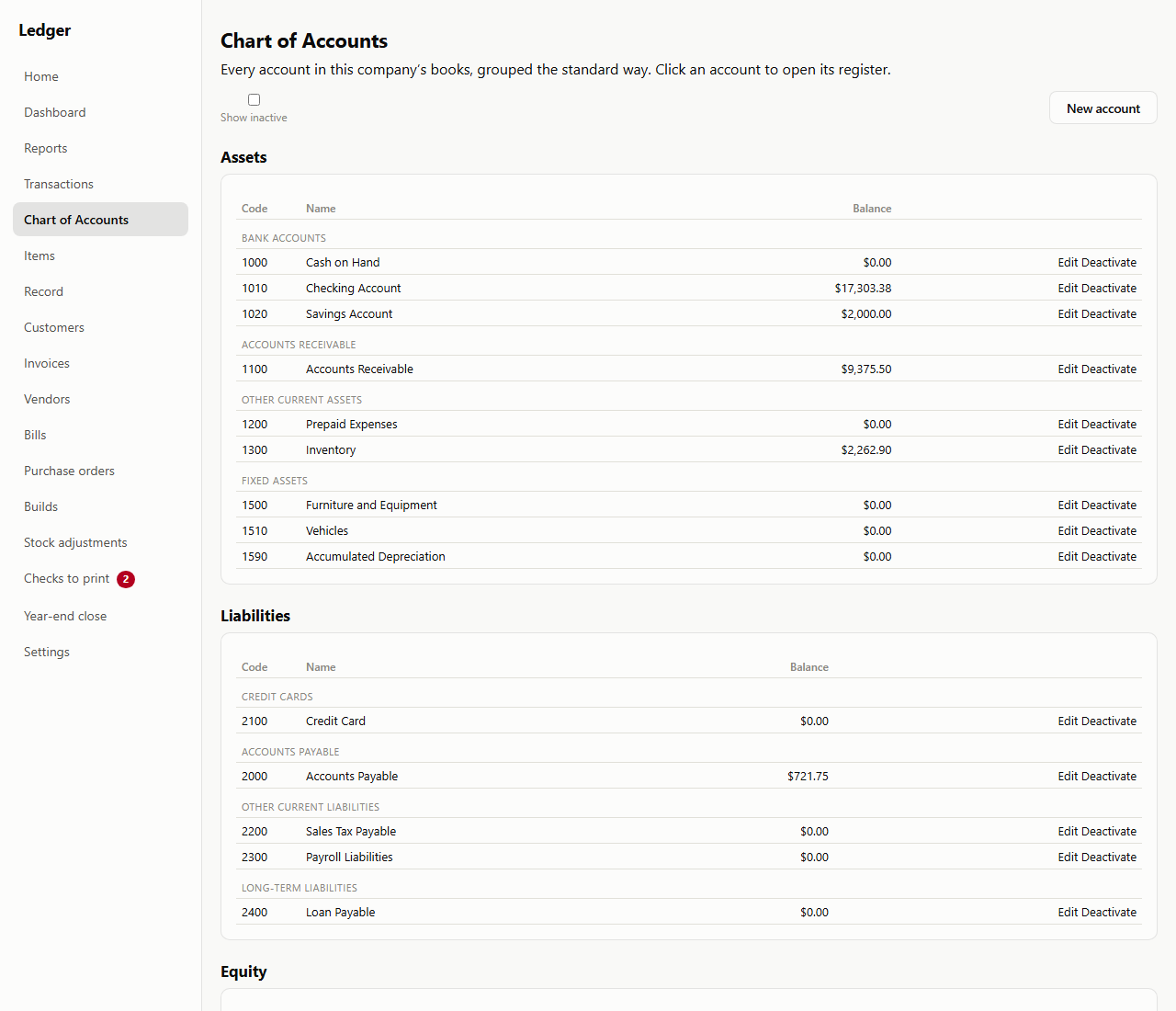
Plain English is a layer on top, not a replacement. Your accounts sit under the standard headings — Assets, Liabilities, Equity, Income, Expenses — and the standard groupings inside them, so a credit card is filed under Credit cards, not buried in "Other."

Add an account, rename one, or retire one you've stopped using — retired accounts drop out of every picker while their history stays exactly where it was. Nothing is ever deleted. Click any account to open its register.

The Chart of Accounts screen, subtitled: every account in this company's books, grouped the standard way — click an account to open its register. Assets are broken into Bank accounts (Cash on Hand, Checking Account $17,303.38, Savings Account), Accounts receivable, Other current assets (Prepaid Expenses, Inventory $2,262.90) and Fixed assets. Liabilities follow, broken into Credit cards, Accounts payable $721.75, Other current liabilities and Long-term liabilities, with an Equity heading below. Every row carries a numeric code, a name, a balance and Edit and Deactivate links, and a New account button sits at the top.
Standard headings, standard groupings, real account codes — the words your accountant already uses.
Stock

Items, purchase orders, and receiving

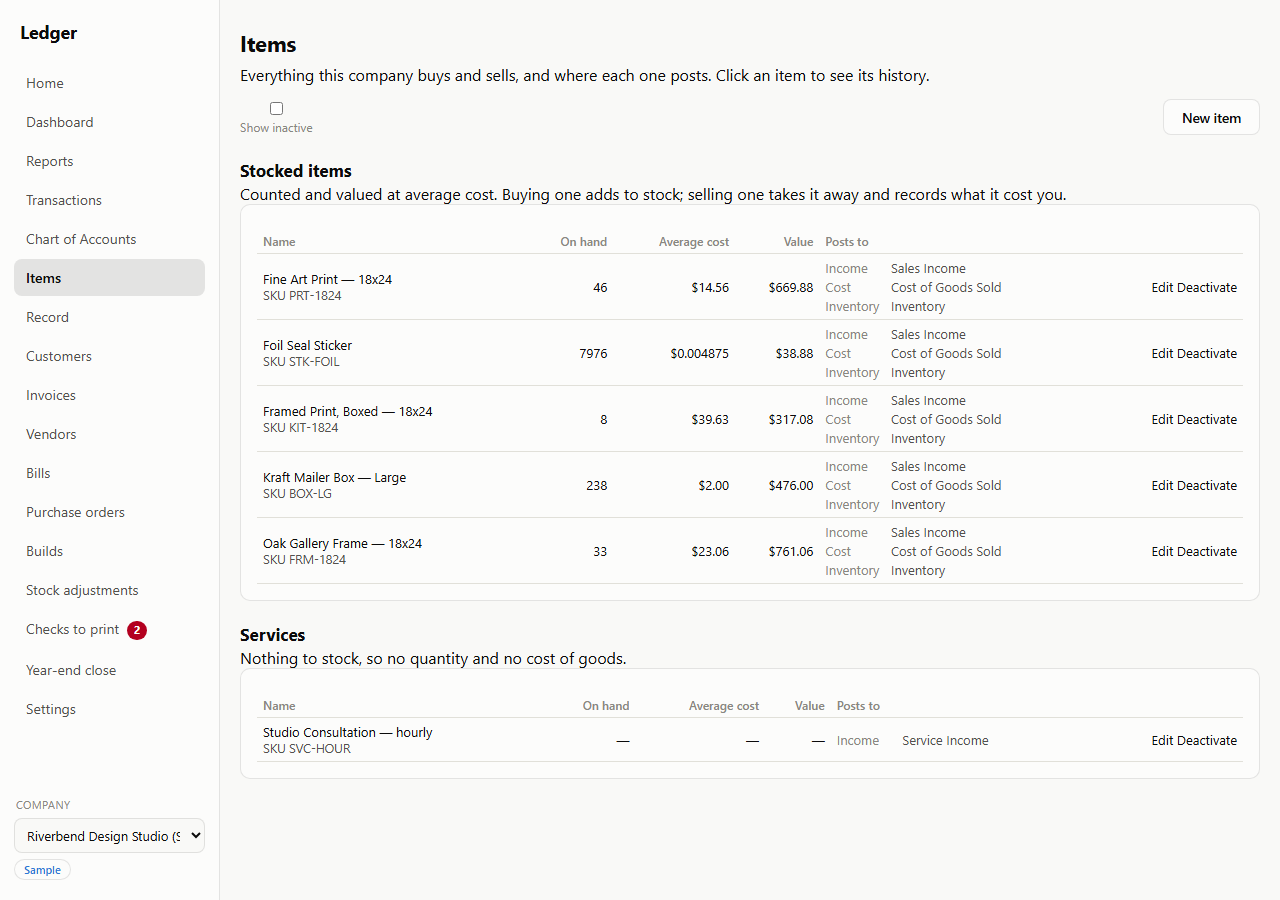
Keep a quantity of something and Balanced Sum keeps its value with it. A bill brings stock in, an invoice takes it out and posts the cost of what you sold, and every item says on its face which three accounts it touches. Purchase orders track what you ordered against what actually arrived, and receiving a purchase order fills in the bill for you. Nothing is typed twice, and stock can never go negative.

Things you don't stock are just as plainly not stocked: a service carries no quantity, no cost, and no cost of goods sold.

The Items screen, split into Stocked items and Services. Five stocked items — a fine art print, a foil seal sticker, a framed print, a large kraft mailer box and an oak gallery frame — each show a SKU, the quantity on hand, an average cost (as fine as $0.004875 for the sticker), the resulting value, and the three accounts the item posts to: Sales Income, Cost of Goods Sold and Inventory. Below, a Studio Consultation service shows dashes for on hand, average cost and value, and posts only to Service Income.
Every item says where it posts. A service shows dashes for quantity and cost, because there's nothing to stock.
Builds

Turn parts into a finished item

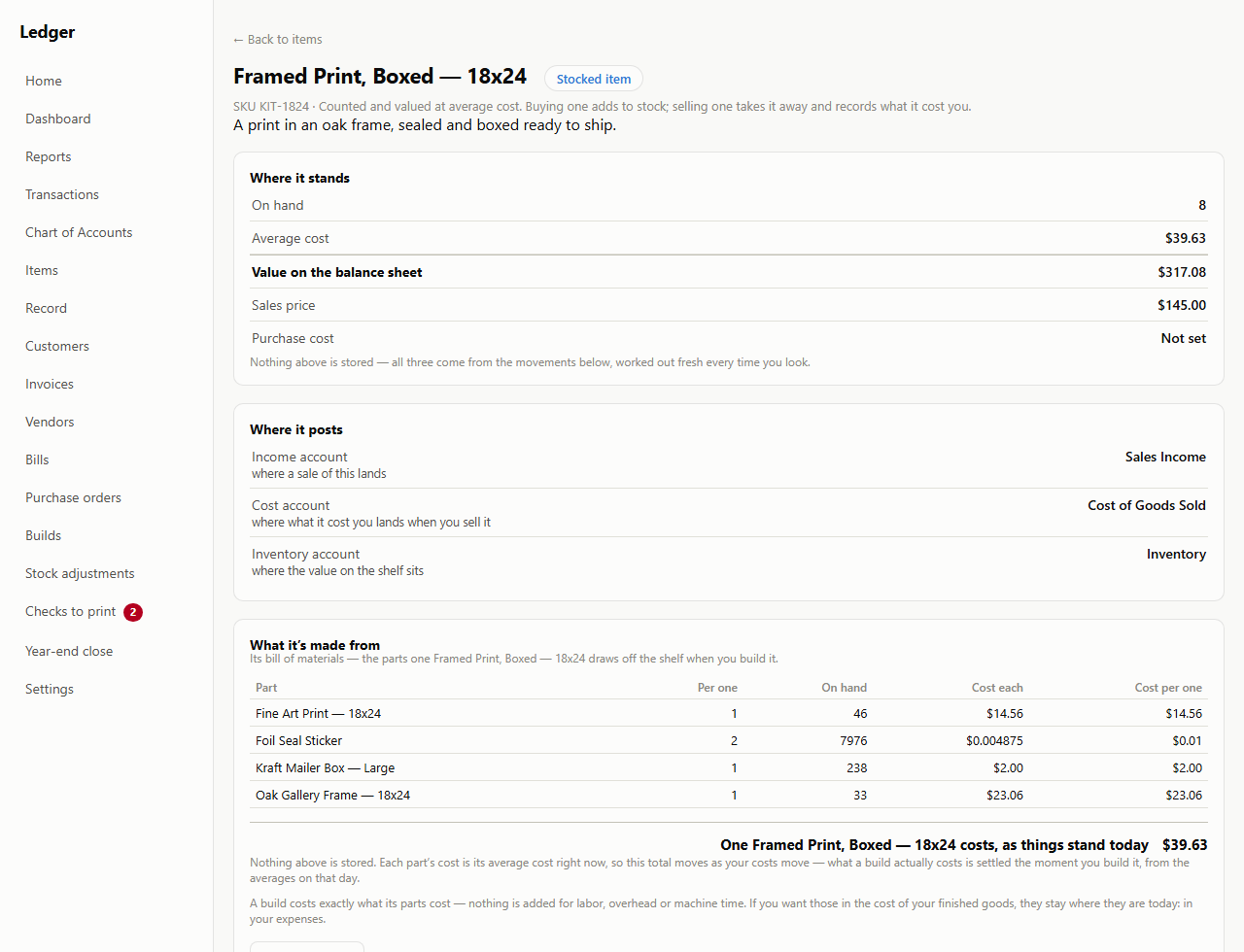
Give an item a bill of materials and you can build it: the parts come off the shelf, the finished item goes on, and the value moves with them in one posting. A build costs exactly what its parts cost that day — no labor, no overhead, no machine time is added.
Open any item and it shows its own arithmetic: what's on hand, what it averages, what it's worth on the balance sheet, and which parts that number is made of. None of it is stored — every figure is worked out from the movements underneath, every time you look. A build is never deleted either; undoing one records the opposite of it, so a year you've already closed still adds up.

The detail page for a stocked item, Framed Print, Boxed — 18x24. A Where it stands panel gives 8 on hand at an average cost of $39.63, worth $317.08 on the balance sheet, against a $145.00 sales price, and notes that none of the three figures is stored — all come from the movements below. A Where it posts panel names its income, cost and inventory accounts. A What it's made from panel lists the bill of materials: one fine art print at $14.56, two foil seal stickers at a penny, one large kraft mailer box at $2.00 and one oak gallery frame at $23.06, totalling $39.63 as things stand today.
What a finished item is made of, and what those parts cost today — the arithmetic, not a stored number.
Inventory valuation

The number that proves your stock and your books agree

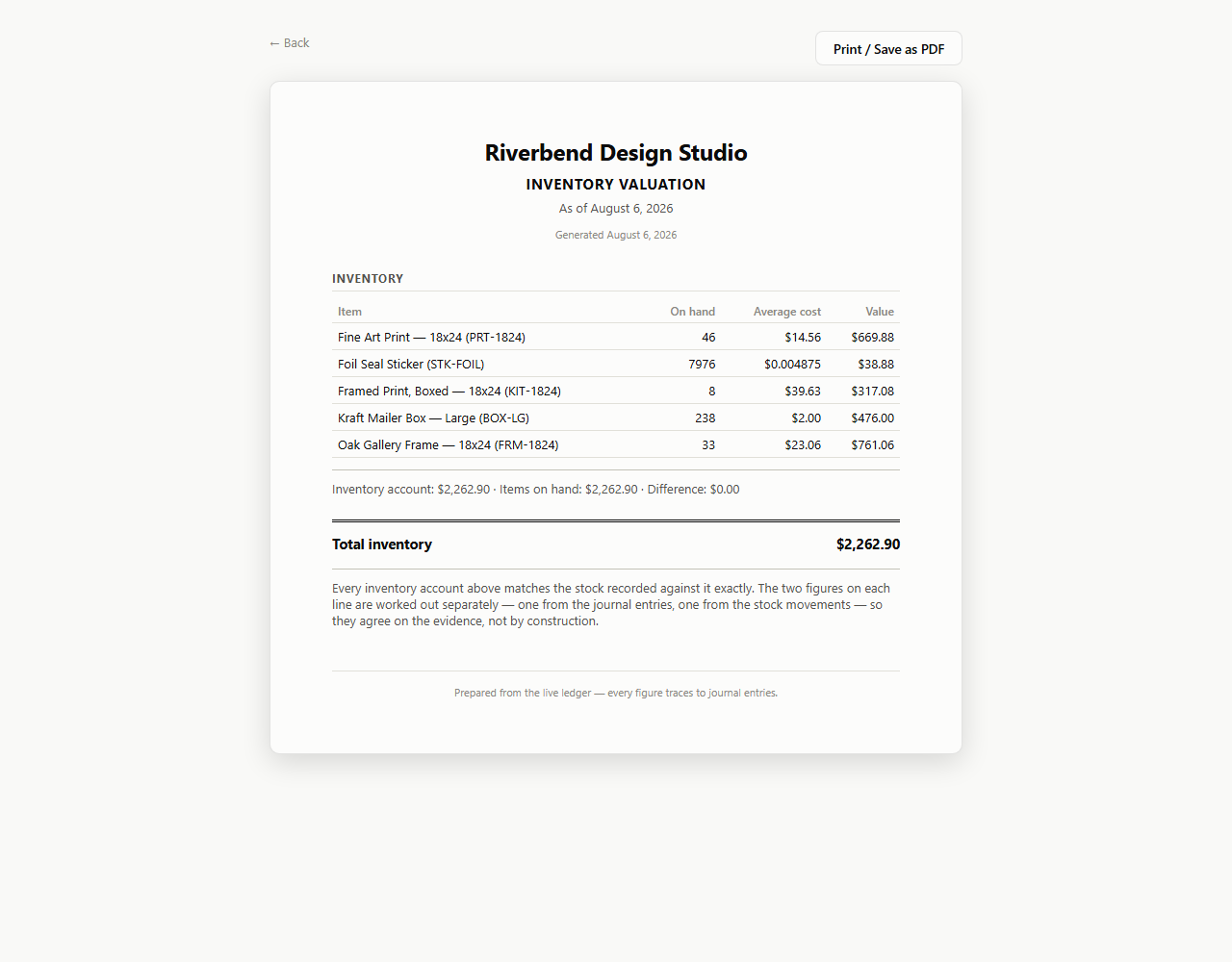
The inventory valuation report shows what's on your shelves item by item — and next to it, the balance your books say is there, and the difference between the two. The two figures are worked out separately, one from the journal entries and one from the stock movements, so when they agree they agree on the evidence rather than by construction.

Kept deliberately plain: average cost only, one location, no serial or lot numbers, and no work orders. If you need standard costing or a shop floor, this isn't that.

A printable inventory valuation report for Riverbend Design Studio as of August 6 2026, listing five items with SKUs, quantity on hand, average cost and value. Under the list a reconciling line reads: Inventory account $2,262.90 · Items on hand $2,262.90 · Difference $0.00, above a total inventory of $2,262.90. A note explains that the two figures on each line are worked out separately — one from the journal entries, one from the stock movements — so they agree on the evidence, not by construction.
Stock records on one side, the ledger on the other, and the difference between them. It's zero.
The rest of it

It fits your work before you've typed anything

Two decisions you make once, at the start: what kind of work you do — which settles the chart of accounts you begin from — and whether you charge sales tax at all.

A chart that already fits your work

You'll never face an empty chart of accounts. Tell the setup wizard what kind of work you do — general small business, services and consulting, retail and online sales, restaurant and food service, construction and trades, field services, rental property, or a professional practice — and it builds a working chart that names your world. Change anything you like afterwards.

Sales tax, only if you charge it

Off by default, and completely invisible while it is. Turn it on and you get rates you define, a taxable/non-taxable choice per invoice line, tax-exempt customers, a payable account that builds as you collect, and a sales tax report that tells you what to remit — which you then pay like any other bill.

Why it's safe to trust

Your books can't be quietly edited

Posted history is immutable

Once a transaction is posted, nothing — not you, not us, not a bug — can edit or delete it. Fix a mistake with a correcting entry, and the app writes it for you and shows you exactly what it will change before it happens. The original entry stays, forever, for anyone to see. In most accounting software a closed year can still be reopened and quietly edited by whoever has the right password; here it can't be, and that's the whole reason a closed year actually stays closed.

Your data never leaves your machine

There's no account to create, because there's nowhere to send your data.

  • No cloud — your database runs on your own computer.
  • No telemetry — nothing about your books or your usage is ever sent anywhere.
  • Backups you control — a plain file, taken when you start the app, at most once a day, into a folder on your machine (Documents\Accounting Backups by default).
  • One download, on the first run only — Balanced Sum fetches the database it keeps your books in (PostgreSQL, about 25 MB, from balancedsum.com) the first time you start it, rather than making you install one. Nothing to do with your books, which don't exist yet; it happens once and never again.
  • One outbound connection after that, and you can switch it off — when the app starts, at most once a day, it asks balancedsum.com for the list of released versions so Settings can tell you whether you're behind. It's a request for a public file and carries nothing with it: not your company, not your version, not a thing from your books. Blank out UPDATE_FEED_URL in your .env and it never happens at all. Both, in full →

What it doesn't do

We'd rather you find this out here than three weeks in. Balanced Sum does not run payroll; it does not connect to your bank automatically (you import statement files yourself); it handles one currency; and it doesn't currently ship a Mac, Linux, or phone build. If any of those is the thing you need most, this isn't your program yet.

Stock is tracked, but plainly. Everything is valued at average cost — there is no FIFO, LIFO, or standard costing. There is one location and no bins. There are no serial or lot numbers. A build costs exactly what its components cost, with no labor or overhead added, and there are no work orders, no work in process, and no routings. Sending stock back to a vendor is an adjustment plus a separately recorded vendor credit, not one document. There is no landed cost, no drop-shipping, no backorders, no barcode scanning, no unit-of-measure conversion, and no vendor price catalogs.