Download Balanced Sum
Free to download, free to keep. A complete double-entry accounting system from the Microsoft Store that runs entirely on your own computer. A couple of minutes and a desktop icon — nothing to install first, nothing to configure.
Version 2.2.1 · released September 16, 2026
Get it from the Microsoft StoreWindows 10 or 11 · free · no security warnings, signed and certified by Microsoft · updates arrive through the Store · no account required in the app
What's in it
One install, as many companies as you like, and nothing held back behind a paid tier — there isn't one.
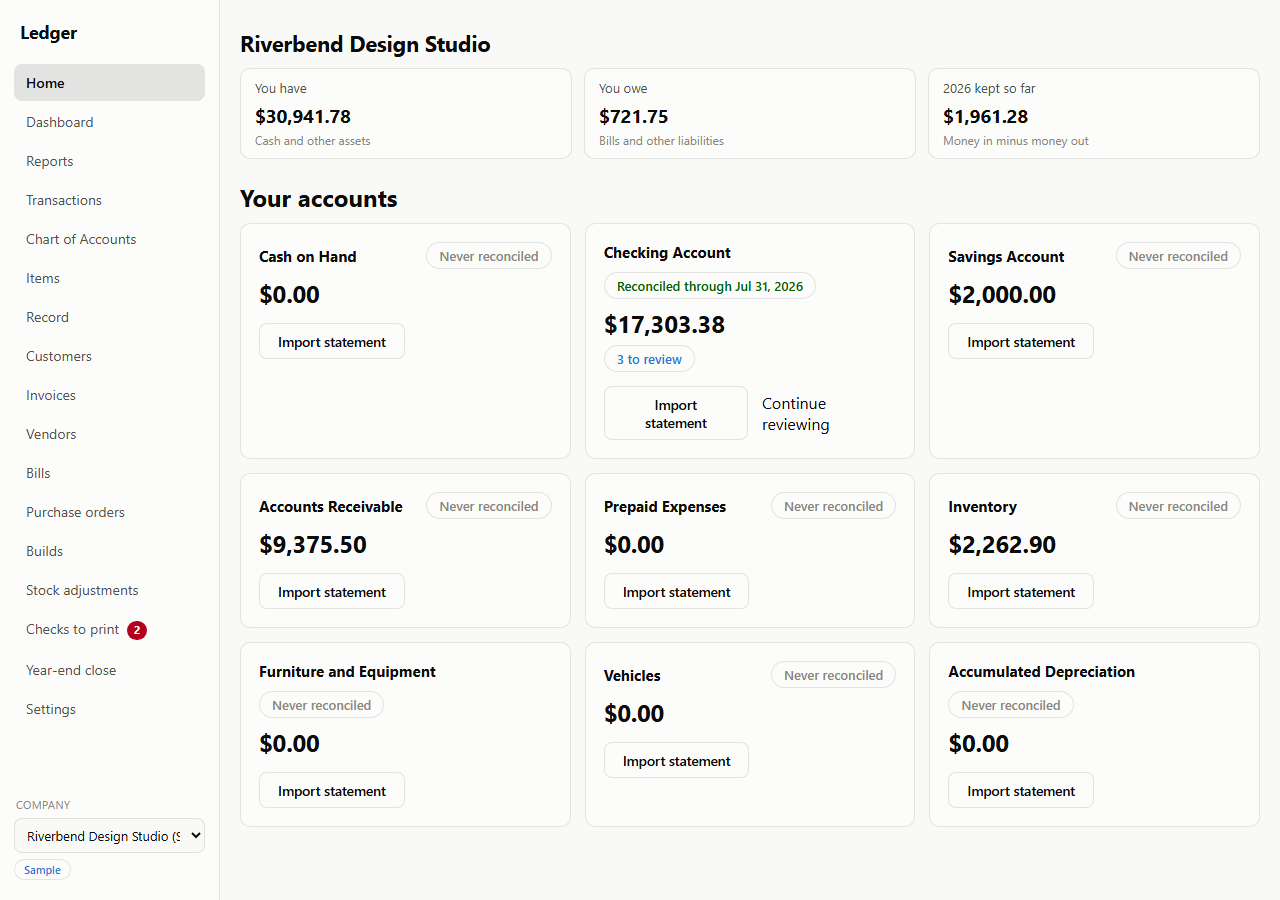
The ledger and the reports
Real double-entry underneath. Profit & loss for any date range; balance sheet, trial balance and A/R and A/P aging as of any date you pick. The profit & loss and balance sheet print straight to PDF. Click an account on a statement and you get that account's transactions.
Transactions and the chart of accounts
A full register of everything posted, filterable by date, account, type, amount or memo text, with per-account running balances and a CSV download of whatever you're looking at. Add, rename, or retire accounts yourself; start from one of eight ready-made charts for different kinds of business.
Customers, invoices, vendors, bills
Invoice customers and record payments (full, partial, or with a credit); enter bills, pay them, and print checks on voucher or three-per-page stock. Optional sales tax with your own rates, exempt customers, and a report of what you owe the state.
Bank statements and year-end
Import statements as .csv, .ofx or .qfx and work down the list — Balanced Sum suggests the match, you confirm it, nothing is categorized behind your back. Close each year against a trial balance and lock it so it can never be edited again. A backup is written when you start the app, at most once a day, to Documents\Accounting Backups on your machine.
A way in from your old software
Bring your full history across from QuickBooks Desktop, Sage BusinessWorks, Sage 50, Xero, Wave, FreshBooks — or anything that can export its general ledger to CSV or Excel. How switching works →
What it doesn't do
No payroll. No automatic bank connections — you import statement files yourself. One currency. Balanced Sum doesn't currently ship a Mac, Linux, or phone build. Stock is tracked at average cost only, in one location, with no serial or lot numbers, no landed cost, no barcode scanning, and no work orders or overhead in a build.
What you'll need
A Windows PC. That's the list. There is no prerequisite to install first, no database to set up, no account to create, and no reboot — the installer carries everything, including the database your books live in.
Balanced Sum doesn't currently ship a Mac or Linux build.
It installs for your Windows account only, so there's no "allow this app to make changes" prompt and nothing to ask your IT person for.
Not even for the first launch. Everything it needs is in the file you downloaded. The only thing it ever asks the internet is whether a newer version exists, and that's a tick box you can turn off.
The whole of it: click the Store button, let it install, open the desktop icon. A couple of minutes, most of it the download. The first launch takes a little longer than the ones after it — it unpacks the database and creates an empty set of books, and it tells you that's what it's doing.
If you get stuck, email support@balancedsum.com — tell us what you were doing and what it said on screen. Please don't attach any of your books; see the contact page for what actually helps.
What you're downloading
One installer, about 126 MB
A single .exe. Run it and you get a desktop icon, a Start-menu entry and an
entry in Add or remove programs, the same as any other Windows program. It installs for
your account only — no administrator prompt — and you can change the folder
if you want to.
It is large because it contains everything: the program, and PostgreSQL 16.10, the database your books are kept in. That's the trade — one bigger download instead of a list of things to go and install yourself.
Nothing is downloaded when you first run it
The first launch unpacks the database that came with the app, checks it against a checksum published inside the program, and creates an empty set of books for it to hold. It narrates all of it. Nothing is installed system-wide, nothing else on the computer is changed, and no part of it needs an internet connection — a machine that has never been online runs Balanced Sum perfectly well.
Your books live in %LOCALAPPDATA%\BalancedSum on your own disk — not
in the program folder, not in the cloud — which is why updating can't touch them,
and why the uninstaller says on screen that it isn't deleting them.
Free updates, and you decide
Balanced Sum asks balancedsum.com once a day whether a newer version exists, and sends nothing with the request. If there is one, Settings tells you. Downloading it is a button; installing it is a second button, and the installer only opens after you close the app — the same accept, next, next, done wizard, which you can still cancel. Nothing ever installs itself.
Switch the check off with a tick box in Settings → Updates and no request is made at all. Exactly what that request does and doesn't contain is spelled out on the privacy page. Being offline never breaks anything, and Settings always shows the version you're on. Your books are untouched by an update, every time, because they aren't in the program folder.